Many Iranian services – from banks and wallets to exchanges and online shops – require, to activate an account, Online identity verification want. This step usually cannot be completed from abroad because of IP restrictions. On this page we explain what you need and how the Iran VPN helps.
What are the requirements for online identity verification from abroad?
- Iranian IP: Most verification systems are available only from inside Iran.
- Mobile number in your own name: Matching the national ID number with the SIM owner (Shahkar) is the most common method.
- Receiving SMS: The Iranian SIM must have roaming, or someone in Iran must receive the code.
- ID documents: Some services also want an image of the national card or a selfie video.
What role does the Iran VPN play in identity verification?
Abarip VPN only removes the foreign IP barrier so verification pages, document upload and the verification video open without errors. Ownership of the number and ID documents is still required.
Services that usually require online verification
- Banking apps and remote account opening (Iran VPN for Banking)
- Government systems such as Sana and Social Security
- Iranian wallets, exchanges and online shops
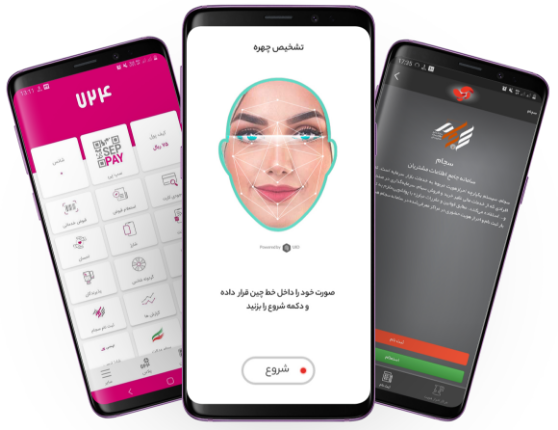
Steps of online verification from abroad
- With Buy a subscription or Free test connect to the Iran VPN.
- Make sure your Iranian mobile number receives SMS.
- Sign in to the service you want and follow its verification steps.
- If a selfie video is needed, use a stable internet connection so the upload does not drop.
Abarip's own identity verification after purchase is also in the user identity verification guide .
Iran VPN plans

1 month
+ 3 bonus daysAbout 1,617,000 Toman by card-to-card
Equivalent to USD 5.36 per month
- 33 days of validity
- 10 GB of traffic
- Use on 2 devices

3 months
+ 10 bonus daysAbout 4,630,000 Toman by card-to-card
Equivalent to USD 5.07 per month
Save 14%
- 100 days of validity
- 30 GB of traffic
- Use on 2 devices

6 months
+ 1 bonus monthAbout 8,191,000 Toman by card-to-card
Equivalent to USD 4.27 per month
Save 28%
- 210 days of validity
- 60 GB of traffic
- Use on 2 devices

1 year
+ 2 bonus monthsAbout 14,765,000 Toman by card-to-card
Equivalent to USD 3.85 per month
Save 35%
- 420 days of validity
- 120 GB of traffic
- Use on 2 devices
The Toman amount is calculated at the daily dollar rate; the exact amount is shown at checkout.
Payment: Pay with an Iranian bank card through Toman card-to-card, which is confirmed automatically; without an Iranian card, cryptocurrency payment is available. After payment, by law a short identity verification with an Iranian mobile number is done and the subscription is delivered immediately in the user panel and the Telegram bot.
Video tutorial for each device: iPhone, Android, Windows and Mac.
Why does identity verification fail from outside Iran?
Verification systems usually check three things: the IP address, an Iranian mobile number and identity documents. If your IP address is outside Iran, the page may not open or the upload of documents and the verification video may be interrupted. Solving the IP problem covers only one of the three requirements; the other two are still needed.
Common errors and how to fix them
- The SMS code does not arrive: before you start, check roaming and SMS reception on the Iranian line.
- The verification video is rejected: record it in good light with a stable connection and show your documents clearly.
- The page only half loads: disconnect and reconnect, then refresh the browser.
Security tips for identity verification
Enter identity details only on official sites and apps, do not send your documents to strangers, and never share the SMS code of a bank or any other system with anyone.
FAQ
Before buying you can Free test get a trial and try the site you want. For any other question Telegram support will answer.